 Apno Ka Pata
Delete your Apno Ka Pata account
App: Apno Ka Pata · Developer: Apno Ka Pata (Kanhaiyalal Sharma), India · Effective 23 November 2026 · Last updated 24 November 2026
Apno Ka Pata is run by Kanhaiyalal Sharma, an individual developer based in Mumbai, Maharashtra, India. You can delete your account in the app, or by e-mail if you no longer have the app. Deleting can't be undone.
In the app (fastest)
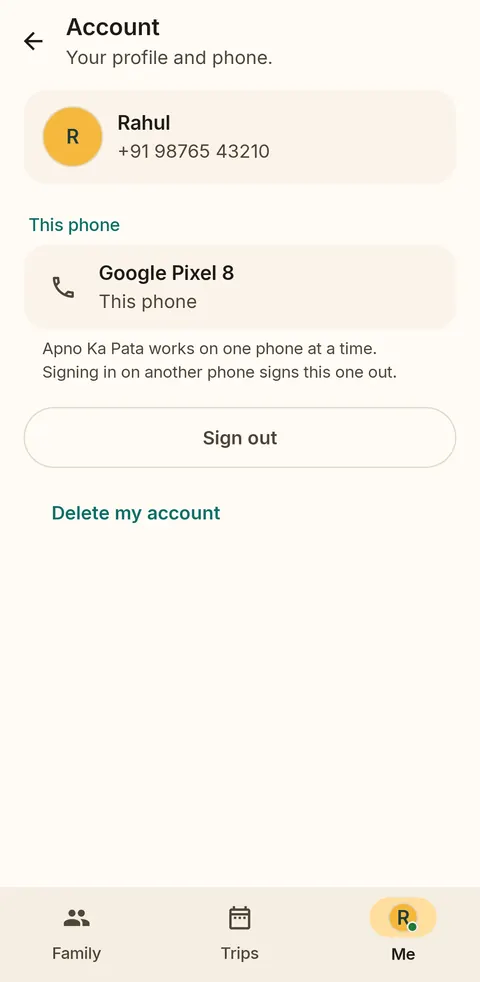
- Open Apno Ka Pata.
- Go to the Me tab, then Account.
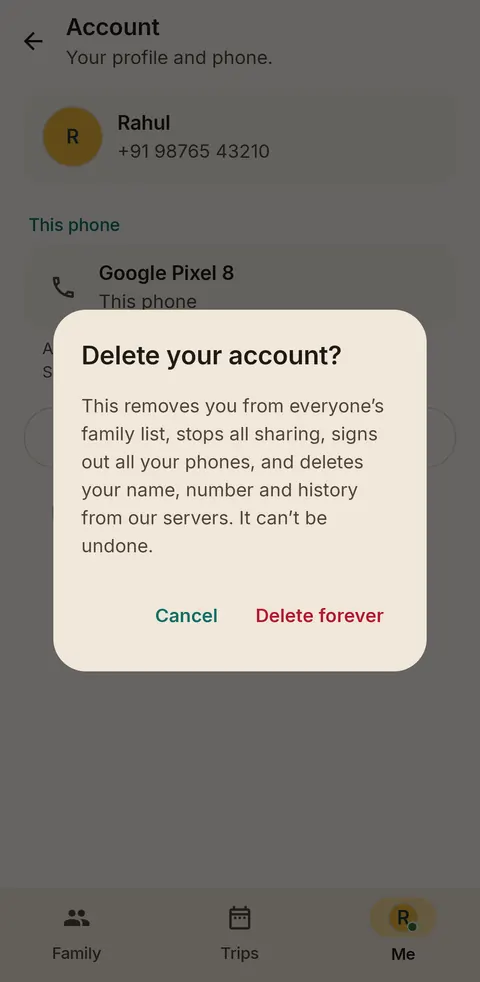
- Tap Delete my account.
- Tap Delete forever to confirm.
Your account is deleted at once. You disappear from other people's lists. They aren't told why.
Without the app
E-mail kanhaiyalal.s.sharma@gmail.com from any e-mail address, with the subject "Delete my account" and the mobile number you signed in with.
- We send an SMS to that number to confirm it's yours.
- After you confirm, we delete the account within 7 days and reply by e-mail.
What is deleted
- Your phone number and name.
- Everyone who can ask where you are, and everyone you can ask.
- Your activity log (who asked whom and when).
- Any encrypted locations still on our servers, sent by you or to you.
- Your "location is off" flags.
- Trip invites you sent, and trip invites sent to your number.
- People you blocked, and people who blocked you.
- Your sign-ins. All your phones are signed out at once, and their push tokens are deleted.
What is kept, and for how long
| Data | Why | Kept for |
|---|---|---|
| Requests you sent to add someone (their number, and the name you gave them) | They are cancelled at once, then removed by our regular clean-up. | Up to 30 days after each request was sent |
| Requests other people sent to your number | These belong to the person who sent them. | They expire 7 days after they were sent, and are deleted 30 days after they were sent |
| Trips: you leave every trip at once, and trips you created end at once | So the other members' trip records stay correct until clean-up. | Until 30 days after each trip ends |
| Abuse reports about your account. Reports you made stay, but no longer show they came from you. | To keep people safe and stop misuse. | 365 days from the report |
| A record that an account existed, with no number or name: an internal ID, dates, and basic details of the phones that were signed in (app install ID, model, Android and app version, encryption key) | So abuse reports and our records stay consistent. | Kept for now. E-mail us if you want it removed. |
| Server logs | Security and fixing errors. | 30 days |
| Database backups | To recover from a failure. | Up to 30 days, then deleted |
| Sign-in record at our sign-in provider, Google Firebase Authentication (your phone number) | Firebase keeps this to sign you in. | Not deleted automatically. E-mail kanhaiyalal.s.sharma@gmail.com with the number you signed in with, and we will delete it. |
Crash reports collected by Google's Maps and Firebase software are kept as Google sets.
Delete some data without deleting your account
- Locations delete themselves from our servers 15 minutes after they are sent.
- Remove a person under Me, so they can no longer ask where you are.
- Leave a trip, or end a trip you created. Trip records are deleted 30 days after the trip ends.
- Sign out a phone under Me → Account, for example a lost or old phone. Its push token is deleted at once.
- Pause under Me, so nobody gets your location until you resume.
- Turn off "Show when my location is off" under Me → Privacy and safety. Those flags are deleted at once.
The activity log deletes itself after 30 days. To ask us to delete anything else, e-mail kanhaiyalal.s.sharma@gmail.com. See the Privacy Policy for everything we keep and for how long.